HOW IT WORKS
Two halves, one project.
Product teams and delivery teams work differently, so Project Management gives each its own workspace and links them project by project instead of forcing one shape on both.
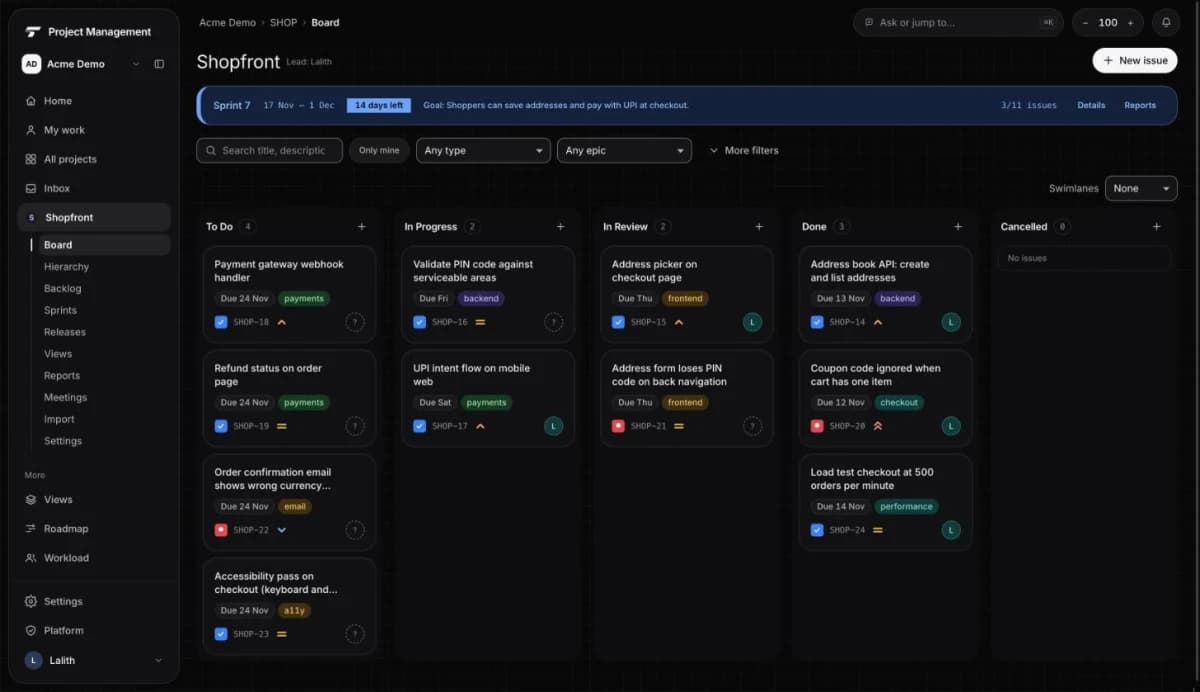
Plan the sprint
Epics, stories, tasks, bugs and sub-tasks on a Kanban board with drag and drop, a backlog, sprints, burndown and velocity. The tool a product team works in every day.
Deliver the engagement
Phases, waves, tasks, a RAID log, inventory and payment milestones with customer sign-off, for cloud-migration and infrastructure engagements run for a client.
Two halves, one project
A delivery project is linked one to one to an agile project. Phases become epics, open RAID issues and risks become issues, current and next waves become sprints, and Delivery tasks show on the agile Board and in My work.
PLAN AND TRACK
Everything a team needs to plan and ship.
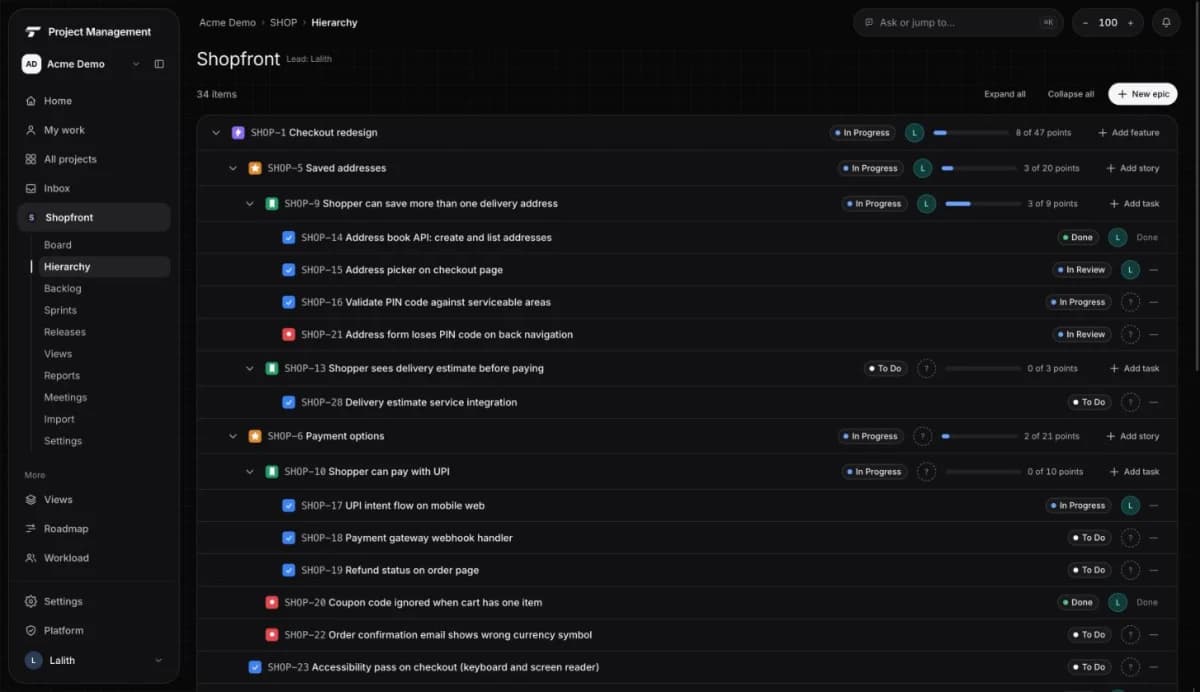
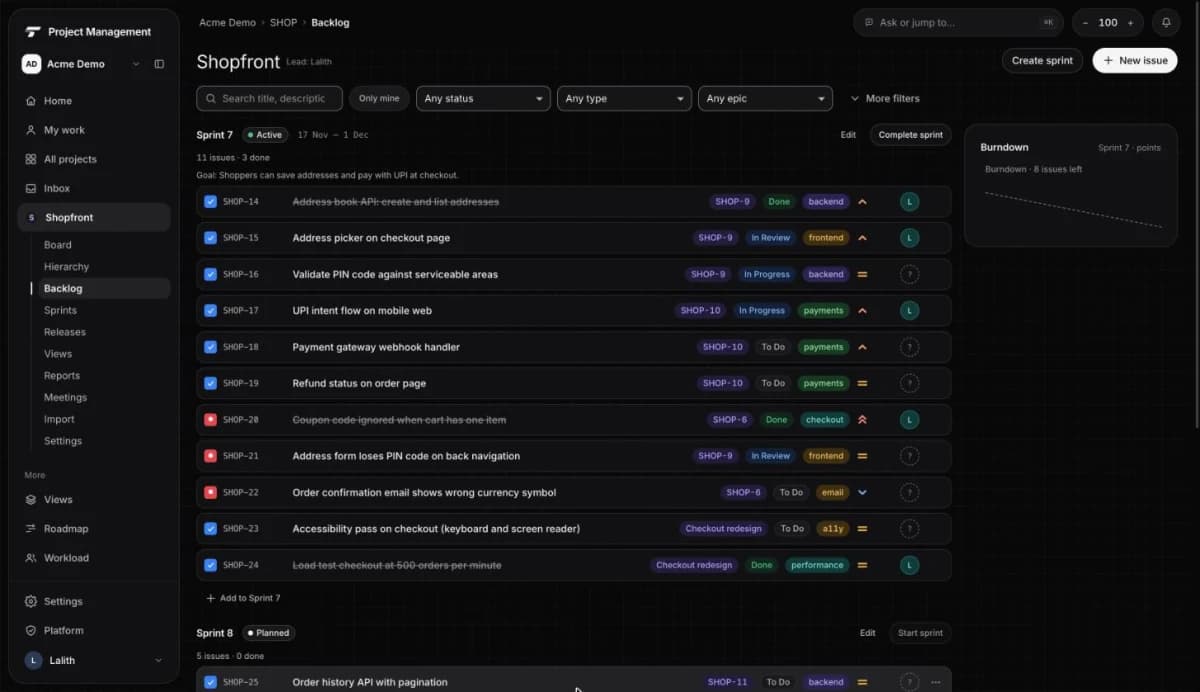
Screens are from the product itself, showing a demo organisation’s data.
Five issue types, one project
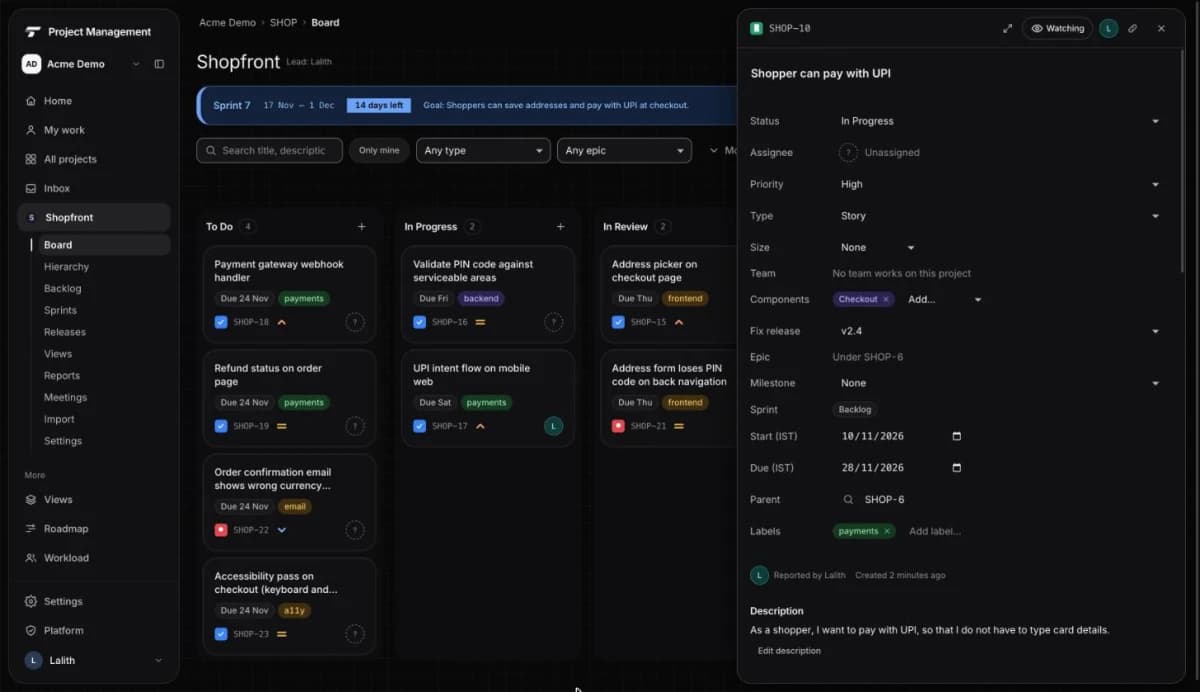
Epic, story, task, bug and sub-task, with T-shirt sizes, components, labels, watchers, comments with @mentions, attachments and a Cancelled status that asks for a reason.
Kanban with swimlanes
Drag and drop cards between columns, group by assignee, feature or team, and see team WIP limits as a warning, not a block.
Backlog to sprint to report
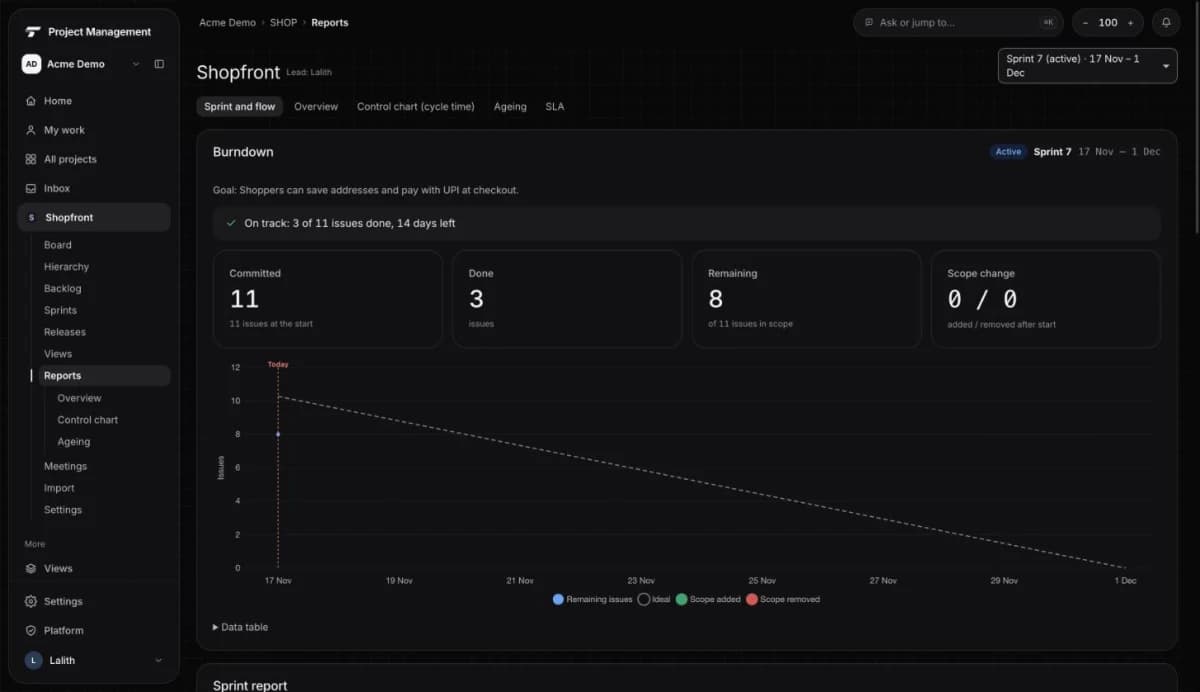
Rank one backlog, plan sprints against capacity per person, then read the burndown, velocity and sprint report.
A wiki per project
Markdown pages with version history, restore as a new version, and issue keys that turn into links.
VIEWS AND REPORTS
See the work the way each person needs to.
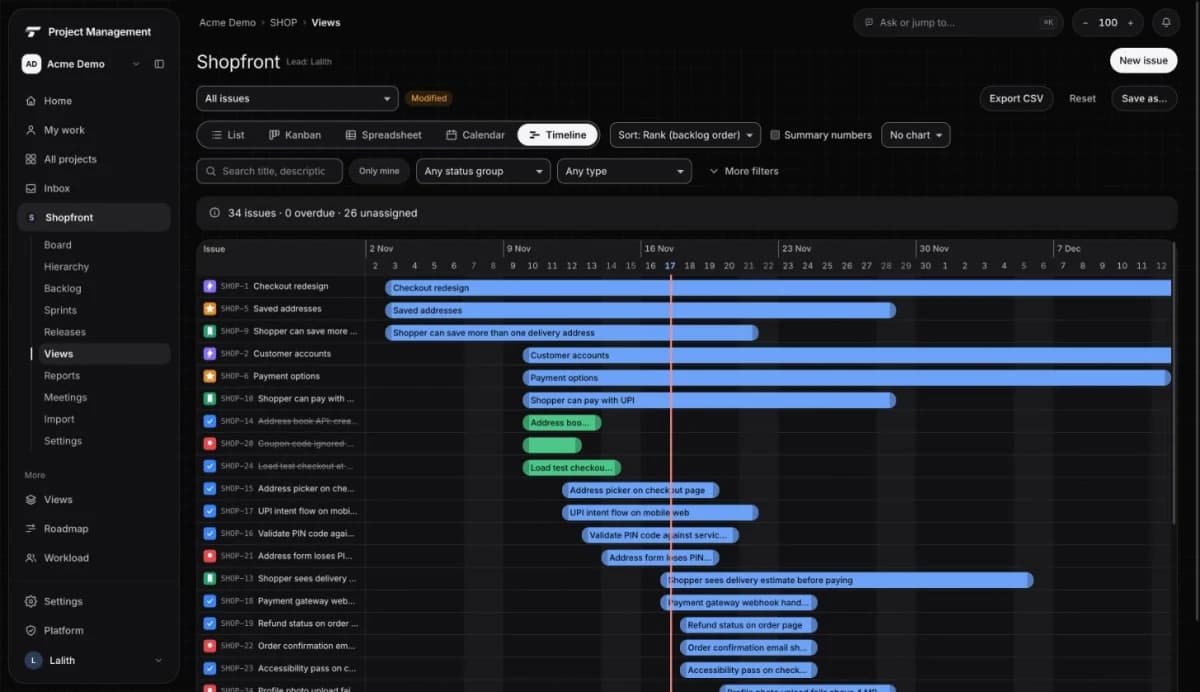
List, board, calendar, timeline, spreadsheet
Save a filter and a layout as a private view or share it with the organisation. Edit in place in the spreadsheet, calendar and timeline.
Control chart, ageing and SLA
Cycle and lead time, how long open work has sat in a status, and intake SLA performance, each exportable to CSV or XLSX.
Epics, milestones and releases
A roadmap of epics with progress, milestones with due dates, and releases with generated release notes.
Capacity and load
Capacity per sprint and an organisation workload view, so overload shows before the sprint starts.
WORKFLOW AND AUTOMATION
Rules the tool enforces, so people do not have to.
Blocked transitions and validators
Edit statuses, forbid moves between them, and require evidence such as a merge request or a passing scan before an issue can enter a status.
Segregation of duties built in
Gate a status behind one or more approvals. The requester never approves their own request, and the reporter cannot approve a move to done.
Rules in When, If, Then form
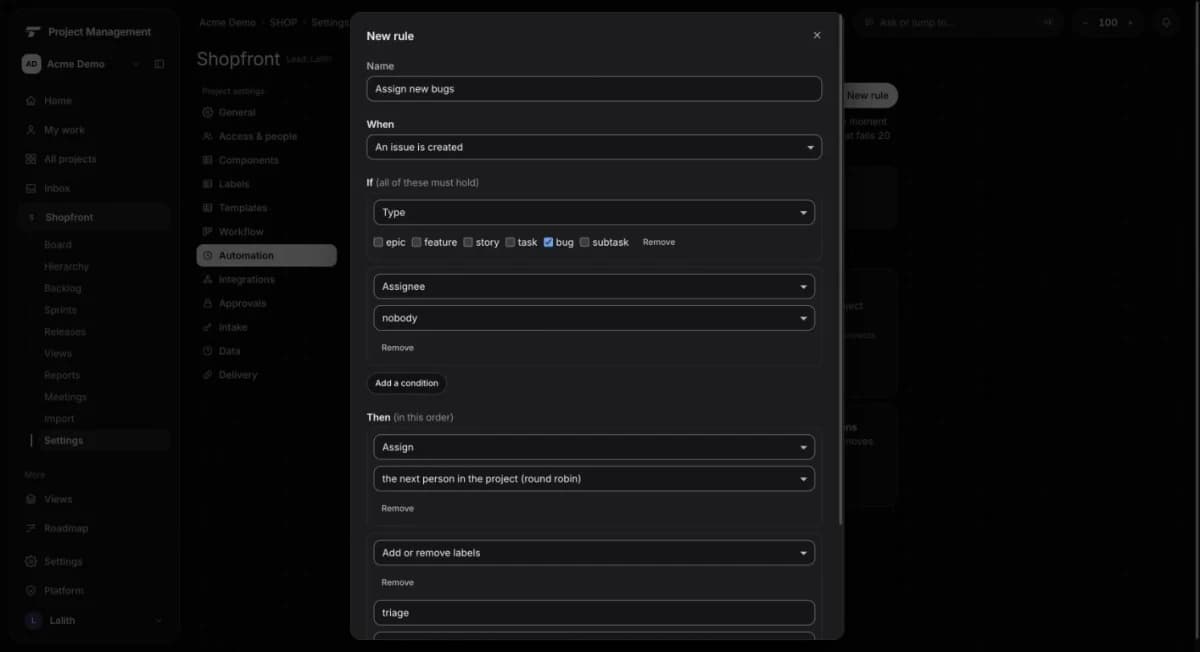
Triggers on create, status, field changes, comments, due dates, SLA breach and sprint end; actions such as assign, transition, comment, notify, and a message to Microsoft Teams or Slack.
In-app inbox and email
Watchers, @mentions and per-person preferences, with email sent after the change has committed.
CUSTOMERS AND INTAKE
Bring customers and requests in without losing control.
Let customers in, show them only their project
A customer sees only the projects they are added to and the people they share a project with. Viewers are read-only.
Requests with an SLA clock
People ask for work through intake, each request carries a due time from its type’s SLA target, and a triager accepts it into an ordinary issue.
Teams with WIP limits
Organisation-level teams attached to projects, with leads, skills and a WIP limit shown on the board.
Bring your Jira history
CSV import recognises Jira export columns, shows a dry run per row, and skips what already exists when you import the same file again.
DELIVERY WORKSPACE
For cloud-migration and infrastructure engagements.
The Delivery workspace is built for work done for a client under a contract: phases, waves, risks and a customer who signs off milestones. It is the DevOps & Delivery module.
The shape of the engagement
Plan the engagement as phases and waves, with tasks under each, and follow progress as the work moves.
Risks, assumptions, issues, dependencies
One log for the engagement. Open issues and risks flow into the agile project as issues so the team works them where they already work.
What is being moved, and when
An inventory of what is in scope and a calendar of the dates that matter.
Customer sign-off, with no money fields
A milestone has status, dates, early or late, and a recorded sign-off with name, date and reference. Money is deliberately not stored: finance gets the evidence, not an ERP.
Phases become epics
Linking creates epics from phases, issues from open RAID items, and sprints from the current and next waves. Delivery tasks appear on the agile Board and in My work.
Customers read, staff write
External customer members see the Delivery side of their project read-only, so the engagement is transparent without being editable by the client.
INTEGRATIONS AND SIGN-IN
Fits the tools you already run.
Link merge requests and commits to issues by key, post scan and test results from CI, message Teams or Slack, and call your own systems with signed webhooks.
SECURITY — PROJECT MANAGEMENT
Customers and suppliers in one tool need hard boundaries.
Project Management is used by your staff and by your clients’ staff. The boundaries between organisations, projects and people are enforced where the data lives, not only in the interface.
Row-level security, not application trust
Every organisation is a tenant, enforced by PostgreSQL row-level security on every query. A query outside an organisation’s context sees nothing.
A project you cannot see is “not found”
Private projects and project roles (admin, member, viewer) are enforced in the database too. No access answers 404, never “forbidden”, so existence is not revealed.
Customers see their project and nothing else
External members see only the projects they are added to and only the people they share a project with. They are never assigned, mentioned or notified outside it.
Google, Microsoft, or your own provider
No account is created by email domain. Per-organisation single sign-on uses OpenID Connect with PKCE and no client secret stored, and an owner can make it mandatory.
Nobody approves their own request
Approvals bar the requester, and bar the reporter on a move to done. Approvals can require evidence, and a request goes stale if the issue moves meanwhile.
Hash-chained and append-only
Membership, access, project, integration and export changes are recorded in a chain that can be verified end to end and exported to CSV. The application cannot edit or delete a record.
Narrow by design
API tokens are personal, read or write, bound to one organisation and expiring. Webhooks are signed, and a target on a private network address is refused when it is saved and again when it is sent.
Your provider, your key, your confirmation
The owner picks the AI provider and the key is stored encrypted. Only what the person can see is sent, and nothing is written until a person confirms the proposals.
DEPLOYMENT
Hosted for you, or installed on your own cluster.
Hosted by SISLCloudWorx
Run on Google Cloud and operated by us. Every organisation is a tenant of the shared service, isolated by row-level security, and set up with our team.
- ✓Included on every plan
- ✓Google or Microsoft sign-in
Self-hosted on your Kubernetes
A portable single-tenant install on your own cluster, with S3-compatible storage and no Google Cloud dependency. Your data stays in your infrastructure.
- ✓Enterprise
- ✓Installed with our team
PRICING
Two modules. Pay for the one you use.
Software development for product teams, DevOps & Delivery for client engagements. Each module is licensed on its own. Per user per month, in US dollars.
Software development
For product teams, covering product projects.
- ✓Product projects: epic, feature, story, task, bug and sub-task
- ✓Board, backlog and sprints
- ✓Hierarchy view with rolled-up progress
- ✓Burndown, velocity and sprint report
- ✓Roadmap of epics, and releases with generated release notes
- ✓Saved views (list, board, calendar, timeline, spreadsheet)
DevOps & Delivery
For cloud-migration, DevOps and infrastructure engagements, covering delivery projects and the Delivery workspace.
- ✓Delivery projects and the Delivery workspace: phases, waves, tasks, RAID log, inventory, calendar
- ✓Payment milestones with customer sign-off
- ✓Each delivery project linked to its own board, views and reports
- ✓Delivery tasks shown on the board and in My work
- ✓Cloud migration and DR drill templates
Enterprise
Identity, audit and your own infrastructure.
Everything in the modules you choose, plus
- ✓Single sign-on through your identity provider (OpenID Connect), which you can make mandatory
- ✓Hash-chained audit log with verification and export
- ✓Self-hosted install on your own Kubernetes, or hosted
- ✓Onboarding and Jira CSV import done with our team
INCLUDED IN EVERY MODULE
Viewers and read-only customer members are free; anyone who can edit counts as a user, once per module they use. Licences are counted per module, so you buy as many of each as you need. Annual billing saves about 18%. Prices are in US dollars and exclude applicable taxes. No card and no self-serve sign-up: every organisation is set up with our team.
Compare modules
Enterprise includes everything in the modules you choose.
| FEATURE | Software developmentSoftware | DevOps & DeliveryDelivery | EnterpriseEnterprise |
|---|---|---|---|
| PRICE | |||
| Price (billed annually) | $9 | $15 | Custom |
| PLAN AND TRACK | |||
| Product projects: epic, feature, story, task, bug, sub-task | ✓ | — | ✓ |
| Board, backlog and sprints | ✓ | — | ✓ |
| Hierarchy view with rolled-up progress | ✓ | — | ✓ |
| Roadmap of epics, and releases with release notes | ✓ | — | ✓ |
| Pages and templates | ✓ | ✓ | ✓ |
| Capacity and workload | ✓ | ✓ | ✓ |
| VIEWS AND REPORTS | |||
| Saved views (list, board, calendar, timeline, spreadsheet) | ✓ | ✓ | ✓ |
| Burndown, velocity and sprint report | ✓ | — | ✓ |
| Bulk edit, CSV import and export | ✓ | ✓ | ✓ |
| Control chart, ageing and SLA reports with export | ✓ | ✓ | ✓ |
| WORKFLOW AND AUTOMATION | |||
| Workflow rules and validators | ✓ | ✓ | ✓ |
| Automation with Teams and Slack | ✓ | ✓ | ✓ |
| Intake requests with SLAs | ✓ | ✓ | ✓ |
| Approvals with segregation of duties | ✓ | ✓ | ✓ |
| PEOPLE AND ACCESS | |||
| Google or Microsoft sign-in | ✓ | ✓ | ✓ |
| Viewers and read-only customers | Free | Free | Free |
| Private projects and project roles | ✓ | ✓ | ✓ |
| Teams | ✓ | ✓ | ✓ |
| External (customer) members | ✓ | ✓ | ✓ |
| Single sign-on (OpenID Connect), can be made mandatory | — | — | ✓ |
| INTEGRATIONS | |||
| API tokens and signed webhooks | ✓ | ✓ | ✓ |
| GitLab and CI evidence | ✓ | ✓ | ✓ |
| AI meeting capture with your own AI provider | ✓ | ✓ | ✓ |
| SECURITY AND GOVERNANCE | |||
| Organisation isolation by row-level security | ✓ | ✓ | ✓ |
| Hash-chained audit log with verification and export | — | — | ✓ |
| DELIVERY | |||
| Delivery projects and workspace (phases, waves, tasks, RAID, inventory, calendar) | — | ✓ | ✓ |
| Payment milestones with customer sign-off | — | ✓ | ✓ |
| Delivery projects linked to their own board, views and reports | — | ✓ | ✓ |
| Delivery tasks on the board and in My work | — | ✓ | ✓ |
| Cloud migration and DR drill templates | — | ✓ | ✓ |
| DEPLOYMENT AND SUPPORT | |||
| Hosted SaaS | ✓ | ✓ | ✓ |
| Self-hosted on your Kubernetes | — | — | ✓ |
| Onboarding and Jira CSV import by our team | — | — | ✓ |
FAQ
Questions worth answering up front.
We use Jira today. How do we move across?
Import from a Jira CSV export. Project Management recognises the columns Jira writes, such as Issue key, Sprint, Epic Link and Story point estimate, and shows a dry run with every problem listed per row before anything is written. Importing the same file again skips what already exists, so a re-run is safe. On Enterprise our team does the import with you.
Can customers see their project without seeing everything else?
Yes. A customer is added as an External member and sees only the projects they are added to, and only the people they share a project with. They can be given read-only or working access on that project. Viewers are read-only everywhere, and a project someone cannot see answers “not found” rather than “forbidden”.
How are organisations kept apart?
By PostgreSQL row-level security in the database, not only by application code. Every query runs inside the organisation’s own context, and a query without one sees nothing. Private projects are enforced the same way, so a person outside the project cannot read its issues even through a direct query.
Is it hosted, or can we run it ourselves?
Both. SISLCloudWorx hosts it on Google Cloud, or you can install a single-tenant copy on your own Kubernetes cluster with S3-compatible storage and no Google Cloud dependency. Self-hosted install is part of Enterprise.
How does sign-in and single sign-on work?
Sign-in is invite-only, with Google or Microsoft, in every module. On Enterprise an owner can connect the organisation’s own identity provider through OpenID Connect (Authorization Code with PKCE, no client secret stored) and make it mandatory for everyone in that organisation.
How is AI used, and who sees our data?
AI is optional and off until an owner turns it on. The owner chooses the provider: Google Vertex AI, Anthropic Claude or SISL’s NeuroRoute, and the key is stored encrypted. Meeting capture, story drafting and summaries send the model only what the person asking is allowed to see. Nothing is written to a project until a person reviews and confirms the proposals.
What is the Delivery workspace, and who is it for?
It is the half of Project Management built for cloud-migration and infrastructure engagements: phases, waves, tasks, a RAID log, inventory, a calendar, and payment milestones with customer sign-off. A delivery project is linked one to one to an agile project, so phases appear as epics and open RAID issues and risks as issues. Payment milestones carry status, dates and sign-off, and deliberately no money fields.
Who counts as a paid user, and how is billing done?
Pricing is per user per month, per module, in US dollars, and prices exclude taxes. Software development is $9 billed annually or $11 billed monthly; DevOps & Delivery is $15 or $18. Each module is licensed separately, so the number of users can differ between the two. Annual billing is about 18% less than monthly. Anyone who can edit counts as a user, with a minimum of 5 users. Viewers and read-only customer members are free. Enterprise is an annual contract from 50 users. There is no self-serve sign-up: every organisation is set up with our team.
Do I need both modules?
No. An organisation can turn on product projects, delivery projects or both. You buy licences for each module separately, as many as the people who work in it: for example 40 Software development users and 10 DevOps & Delivery users. A person who works in both needs a licence for each.
Run the sprint and the engagement in one place.
Bring a real project to the walkthrough, and we will show it on the board, in Delivery and through a customer’s eyes.